mirror of
https://github.com/open-webui/open-terminal.git
synced 2026-11-22 21:50:43 -05:00

136 lines
8.5 KiB
Markdown
136 lines
8.5 KiB
Markdown
# Open Terminal
|
|
|
|
**A computer for your AI agents.** Run commands, search and manage files, execute code, and work with browsers and desktops through a self-hosted REST API. Connect it to [Open WebUI](https://github.com/open-webui/open-webui), or use it with your own tools.
|
|
|
|
[Documentation](https://docs.openwebui.com/features/open-terminal/) · [Changelog](CHANGELOG.md) · [Report an issue](https://github.com/open-webui/open-terminal/issues)
|
|
|
|
[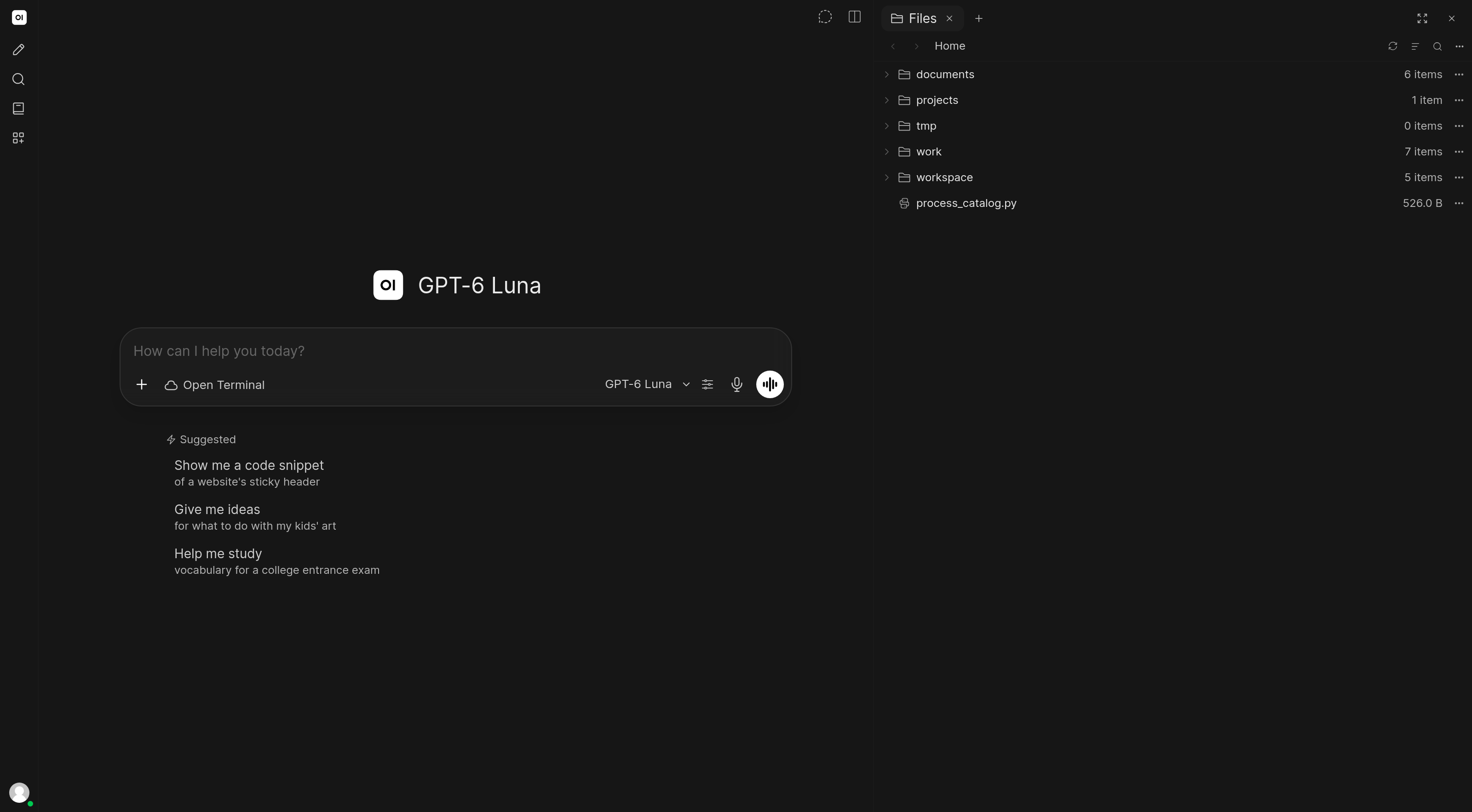](https://docs.openwebui.com/features/open-terminal/)
|
|
|
|
[](https://pypi.org/project/open-terminal/)
|
|
[](LICENSE)
|
|
[](https://github.com/open-webui/open-terminal)
|
|
|
|
## Installation
|
|
|
|
### Docker
|
|
|
|
```bash
|
|
docker run -d --name open-terminal --restart unless-stopped \
|
|
-p 8000:8000 \
|
|
-v open-terminal:/home/user \
|
|
-e OPEN_TERMINAL_API_KEY=your-secret-key \
|
|
ghcr.io/open-webui/open-terminal:latest
|
|
```
|
|
|
|
The API is available at `http://localhost:8000`, with interactive docs at [/docs](http://localhost:8000/docs). The volume keeps your files between container updates. Replace `your-secret-key` with your own key.
|
|
|
|
| Image tag | Includes |
|
|
| --- | --- |
|
|
| `latest` | Full toolkit: Python, Node.js, build tools, browser, desktop, and document tools |
|
|
| `agents` | Everything in `latest`, plus the latest Codex and Claude Code CLIs |
|
|
| `slim` | Minimal Debian environment with git, curl, and jq |
|
|
| `alpine` | Minimal Alpine environment with git, curl, and jq |
|
|
| `openshift` | Minimal image for OpenShift restricted non-root policies |
|
|
|
|
Use `:agents` to run `codex` or `claude` from a terminal, signing in with your own account. See the [deployment guide](docs/deployment.md) for agent setup, image capabilities, custom packages, and updates.
|
|
|
|
### Python
|
|
|
|
Requires Python 3.11+.
|
|
|
|
```bash
|
|
pip install open-terminal
|
|
open-terminal run --host 0.0.0.0 --port 8000
|
|
```
|
|
|
|
Or run without installing: `uvx open-terminal run --host 0.0.0.0 --port 8000`.
|
|
|
|
If no API key is configured, one is generated and printed at startup. For Docker, find it with `docker logs open-terminal`.
|
|
|
|
> [!CAUTION]
|
|
> The API key grants command and file access. On bare metal, commands run with your user's permissions. Give access only to people and agents you trust.
|
|
|
|
### Private local IPC
|
|
|
|
Desktop clients can use the existing HTTP/WebSocket API without opening a TCP listener:
|
|
|
|
```bash
|
|
# macOS/Linux: use a socket inside a directory owned by the current user (mode 0700).
|
|
open-terminal run --isolated --ipc /path/to/private-directory/api.sock
|
|
```
|
|
|
|
On Windows, use a local named pipe, for example
|
|
`open-terminal run --isolated --ipc \\.\pipe\open-terminal-private`.
|
|
API-key authentication still applies. `--port 8000` adds a TCP listener;
|
|
it binds to `127.0.0.1` unless `--host 0.0.0.0` is explicitly supplied.
|
|
Use port `0` to select an available port. The bind address and port are logged at startup.
|
|
With `--ipc`, `--host` requires an explicit `--port`; `--cftunnel` is not supported.
|
|
|
|
## Connect to Open WebUI
|
|
|
|
1. Open **Settings → Admin → Integrations → Open Terminal**.
|
|
2. Add a URL reachable from the Open WebUI server and your API key.
|
|
3. Enable the connection and select the terminal in chat.
|
|
|
|
Use the dedicated **Open Terminal** section to get the file browser and terminal panel. Compare [connection modes](docs/deployment.md#connecting-to-open-webui), or see the [connection guide](https://docs.openwebui.com/features/open-terminal/setup/connecting/) for Docker networking and personal connections.
|
|
|
|
## Configuration
|
|
|
|
### Coding agents in chat
|
|
|
|
Install and sign in to the agent CLIs as the user running Open Terminal. In a compatible Open WebUI checkout, selecting this terminal adds its discovered models to the existing model selector as `<agent>/<model>`. Agent conversations run in the terminal's current directory, with streaming output, native tool/extension approvals, attachments, Stop, and conversation continuation.
|
|
|
|
| Agent | Native interface | Executable override |
|
|
| --- | --- | --- |
|
|
| Codex | `codex app-server --listen stdio://` | `OPEN_TERMINAL_CODEX_COMMAND` |
|
|
| Claude Code | `claude --input-format stream-json --output-format stream-json` | `OPEN_TERMINAL_CLAUDE_COMMAND` |
|
|
| Cursor | `agent acp` | `OPEN_TERMINAL_CURSOR_COMMAND` |
|
|
| Grok | `grok --no-auto-update agent stdio` | `OPEN_TERMINAL_GROK_COMMAND` |
|
|
| OpenCode | `opencode acp` | `OPEN_TERMINAL_OPENCODE_COMMAND` |
|
|
| Cline | `cline --acp` | `OPEN_TERMINAL_CLINE_COMMAND` |
|
|
| Gemini CLI | `gemini --acp` | `OPEN_TERMINAL_GEMINI_COMMAND` |
|
|
| Pi | `pi --mode rpc` | `OPEN_TERMINAL_PI_COMMAND` |
|
|
|
|
These adapters target current CLI protocols. ACP model discovery prefers session config options and also reads the native `models` field still advertised by current agents such as Gemini. Pi requires the current RPC `agent_settled` completion event and `--session-id` support. There are no hardcoded model lists. Log in through the CLI before using WebUI; the integration does not run interactive login flows. ACP agents execute their own filesystem and terminal tools in this environment. Pi follows its native tool policy; WebUI forwards extension confirmation dialogs but does not add a separate per-tool permission layer.
|
|
|
|
ACP history replay is suppressed when resuming an already saved WebUI conversation. If an agent does not advertise native resume, the next turn receives the saved conversation text instead. Agent-specific editor extensions beyond ACP's standard permissions and form elicitation are not implemented.
|
|
|
|
The same flow works through Tether's saved connection and outbound relay; the hosted server does not need to reach the local machine's IP. All three applications need the agent-capable changes. Provider CLIs and their login credentials stay in the terminal environment; no provider SDK is required in WebUI. Executable overrides above accept a path to the installed CLI.
|
|
|
|
The authenticated `/agents` catalog advertises installed providers and models. `POST /agents/{provider}/sessions` starts an owned process; `/agents/sessions/{id}` inspects or deletes it. Its `/connect` WebSocket carries native JSONL inside sequenced input/output frames with acknowledgements and replay. Sessions require `X-User-Id` and `X-Session-Id` ownership headers (single-user clients may omit `X-User-Id`). WebSocket clients send an initial `{ "type": "auth", "token": "<API key>", "cursor": 0 }` frame. Agent turns use a single backend task and resume the provider's saved conversation on the next turn; branching/regeneration requires a new chat.
|
|
|
|
### Server settings
|
|
|
|
Configure Open Terminal with CLI flags, environment variables, or a TOML file. CLI flags take precedence.
|
|
|
|
| Guide | Covers |
|
|
| --- | --- |
|
|
| [Configuration](docs/configuration.md) | Config files, browser sessions, storage, and file previews |
|
|
| [Deployment](docs/deployment.md) | Docker variants, coding agents, custom packages, updates, and multi-user setup |
|
|
| [Temporary public access](docs/tunnels.md) | Cloudflare tunnels and troubleshooting |
|
|
| [API reference](http://localhost:8000/docs) | Interactive endpoints on your running instance |
|
|
|
|
## Multi-user deployments
|
|
|
|
Built-in multi-user mode separates workspaces inside one shared container; it does **not** isolate users and is intended for small, trusted deployments.
|
|
|
|
For separate containers per user, use [Terminals](https://github.com/open-webui/terminals). Production use requires an [Open WebUI Enterprise License](https://docs.openwebui.com/enterprise/). See the [security policy](SECURITY.md) for the trust model.
|
|
|
|
## Support
|
|
|
|
[Open an issue](https://github.com/open-webui/open-terminal/issues) for bugs or setup problems. Report vulnerabilities privately through [GitHub Security Advisories](https://github.com/open-webui/open-terminal/security/advisories/new).
|
|
|
|
## Star History
|
|
|
|
<a href="https://star-history.com/#open-webui/open-terminal&Date">
|
|
<picture>
|
|
<source media="(prefers-color-scheme: dark)" srcset="https://api.star-history.com/svg?repos=open-webui/open-terminal&type=Date&theme=dark" />
|
|
<source media="(prefers-color-scheme: light)" srcset="https://api.star-history.com/svg?repos=open-webui/open-terminal&type=Date" />
|
|
<img alt="Star History Chart" src="https://api.star-history.com/svg?repos=open-webui/open-terminal&type=Date" />
|
|
</picture>
|
|
</a>
|
|
|
|
## License
|
|
|
|
[MIT](LICENSE). Bundled third-party tools retain their own licenses and terms.
|